Home

English Composition using Mobile Application Technology
Mary Paul mpaul@csufresno.edu
Fresno State
Course Name & Description: English 10: Accelerated Academic Literacy - Reading and writing in academic and public genres, special attention to rhetorical decision-making and critical analysis. Guided instruction in reading and responding to texts. Participation in public and academic conversations via research in primary and secondary sources.
Project Abstract: This ePortfolio represents a proposed course redesign for Freshman English Composition with the implementation of Mobile Application Technology. Mobile Application pedagogy goes beyond the Flipped Classroom pedagogy in that student engagement and instructor feedback is performed in a "real time" environment. This course is contextualized in a cycle of 15-20 minute lecture followed by a 15-20 minute application and the cycle repeats for the duration of the class.
Keywords/Tags: Enhanced student engagement, tablet pedagogy, real time collaboration
Instructional Delivery: Online, Blended
Pedagogical Approaches: flipped, online, blended/hybrid, active learning, mobile app
Class Size: 25
About the Course Redesign Stage 1 |
Background on the Redesign
Why Redesign Your Course?
- Course Characteristics: This course attempts to address lecture information with immediate engagement of the material and corresponding feedback. Rather than students listening to a lecture and taking notes, students will listen to shorter lectures, engage with the expected learning outcome, and receive instructor feedback simultaneously.
- The Learning Problem: Many of our "feeder" high schools have implemented tablet pedagogy, thus our students are arriving on campus expecting instruction based upon Mobile Application Technology. By engaging with the expected learning outcome and receiving instructor feedback simultaneously, students have the opportunity to clear up any misconceptions regarding lecture content prior to leaving the classroom.
Course History/Background
This course is a gateway course to all university writing classes. It will also be the initial implementation of an institutional ePortfolio system.
High Demand / Low Success Issues
Tablet technology is a high-impact educational tool that can redefine the composition classroom. Many of our first-year freshman students do not have access to a tablet and sufficient wifi capacity. Providing these students with a device and data allows all students an equal voice at the digital table.
About the Students and Instructor(s) Stage 2 |
Student Characteristics
This course fulfills the GE requirement for English Composition, thus engaging the majority of freshman students on all campuses. While this course is not designed for English remediation, the instructional design can be easily revised to accommodate remediated students.
Advice I Gave My Students to be Successful
- Avoid the distraction of social media during class time.
- Access screencast lecture videos outside of class.
- Utilize all of the collaboration tools offered.
- Connect with the librarians in the course Google Community.
Impact of Student Learning Outcomes/Objectives (SLOs) on Course Redesign
- Reading/Writing Strategies: Demonstrate or articulate an understanding of reading strategies and assumptions that guide effective reading, and how to read actively, purposefully, and rhetorically.
- Reflection: Make meaningful generalizations/reflections about reading and writing practices and processes.
- Community Participation: Articulate or demonstrate meaningful participation in a community of readers/writers, and ethical and self-conscious practices that address the concerns of that community of reader/writers.
- Analysis/Making Connections: Demonstrate identifying and summarizing the academic conversation an issue relates to, structuring a text through a controlling idea moving beyond summary, and developing and organizing ideas through explanations and interpretations of their observations and reflection on their own experiences and research.
- Summary/Conversation: Demonstrate summarizing purposefully, integrate “they say” into writing effectively or self-consciously appropriately incorporate quotes into writing, and discuss and use texts as “conversations.”
- Rhetoricality: Articulate or demonstrate an awareness of the rhetorical features of texts, such as purpose, audience, context, rhetorical appeals, and elements, and write rhetorically, discussing similar features in texts.
- Integrating Research: Demonstrate analyzing research to develop an argument, incorporating others’ ideas into writing effectively or self-consciously, and appropriately integrating citations into text.
- Language Coherence: Have developed, unified, and coherent paragraphs and sentences that have clarity and some variety.
Alignment of SLOs With Course Redesign
The course redesign will actively engage all of the SLOs listed but will incorporate a more collaborative in-class learning environment to achieve successful outcomes. The redesigned course will implement student-instructor feedback in a timelier manner than a traditional course, thus assessing the progress of each SLO on a recurring basis. The additional learning tools offered through mobile applications will enhance potential success of each SLO.
Assessments Used to Assess Students' Achievement of SLOs
The assessment of students’ achievement regarding the SLOs in this redesigned course will occur in three levels: in-class writing projects allowing for more immediate and on-going assessment, four argument essay assignments, and the use of a final ePortfolio with a concentrated focus on reflection and process.
Accessibility, Affordability, and Diversity Considerations
Accessibility
This course redesign implements a tablet-agnostic approach. Students have a choice of tablet devices, thus allowing for accessibility. All mobile applications utilized are designed to support all students, including students with disabilities.
Affordability
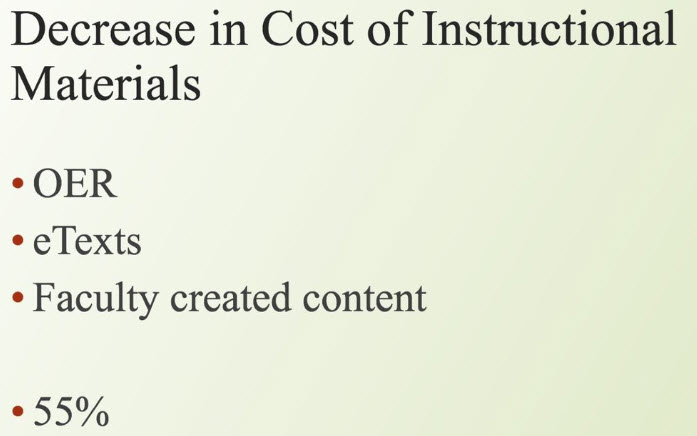
While Fresno State has offered student grants to fund the use of tablets in DISCOVERe courses, it is understood that this is not a sustainable practice for all CSU campuses. This course redesign would require students to supply their own device. While this has the potential of additional costs to students, the use of free textbooks through AL$ will help to offset any additional device expenses. It is also understood that K-12 schools are adopting mobile application instruction at an increasing rate, which would have the potential of students arriving on campus with an adequate device. Tablet-based instruction lends itself to the use of electronic textbooks; this combined with free textbooks for our students provides a more affordable college education. The use of free electronic textbooks via the campus Affordable Learning Solutions saved each student $193. That is a total savings for all ENGL 10 classes of $463,200 over the course of one academic year. All mobile apps integrated into the course requirements are cross-platform and free applications. Electronic submissions eliminate students' printing and paper costs for the course.
Diversity
The initial redesign of this course was implemented with Fresno State’s First Year Experience students: first generation, remediated in both math and English, and 98% Pell Grant eligible. o the pedagogical strategies support students' learning with diverse backgrounds?

About the Instructor
Mary W. Paul
Mary Paul is a Lecturer in the English Department at Fresno State and recently accepted a position in The Merritt Writing Program at University of California, Merced. She holds an undergraduate degree in Accounting and a graduate degree in English Literature. Mary was a Fellow of the initial Fresno State DISCOVERe Tablet Initiative implemented in the Fall 2014, is currently a DISCOVERe Task Force member and co-chair of DISCOVERe Task Force subcommittee of assessment. Mary has taken on a facilitating role in Applied Teaching Technology at Fresno State. She has offered numerous presentations on the topic of Mobile Application Technology’s use in higher education institutions.
Lessons Learned & Redesign Tips
Teaching Tips
- Do not be afraid of “falling down” in front of your students — glitches will occur.
- Enjoy being a learner again.
- Students will problem-solve technology issues; allow them a platform to work things through. You are not expected to be an IT instructor.
- Social media will be a distraction; welcome its conversation.
- If an application fails the first time, continue to work with the process.
- Create an inventory of engaging practices using various apps.advice do you have for others who might want to teach with this redesigned course? (technology training and support, planning, creating learning outcomes, etc.).
Course Redesign Obstacles
- Technology is only as good as your campus’ infrastructure — be prepared for connectivity issues.
- Everything is new for the first month or two.
Strategies I Used to Increase Engagement
- One of the most rewarding aspects of mobile application technology in the classroom is giving students a voice at the digital table. Students who may not enter the conversation in class find that they are willing to speak out through their devices — embrace this.
Course Redesign Planning Stage 3 |
Implementing the Redesigned Course
Which Aspects of Your Course Have You Redesigned?
- This course redesign will utilize a 20-20 pattern of instruction: 20 minutes of lecture followed by 20 minutes of student engagement with the material, simultaneous instructor review and feedback of student engagement using mobile applications, followed by 10 minute review and reflection.
- Moving students into the public domain of rhetoric using Google Sites, ePortfolios and the publication of an IBook in the IBook’s store.
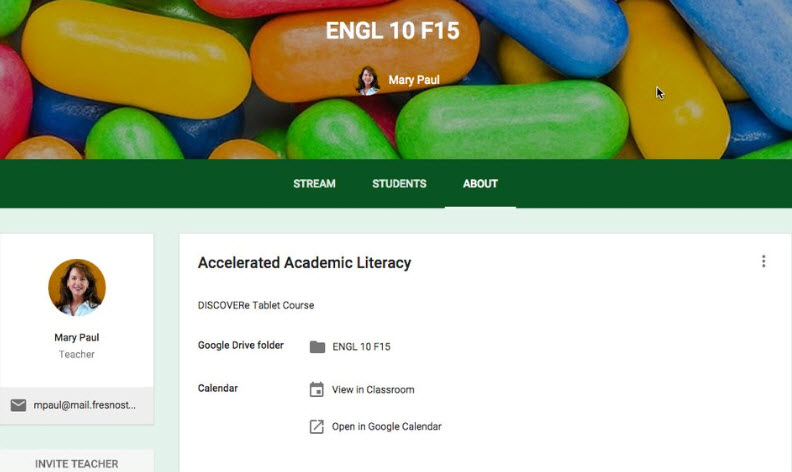
- Collaboration platforms outside of class using Google Communities.
- This course is contextualised in a cycle of 15-20 minute lecture followed by a 15-20 minute application and the cycle repeats for the duration of the class. Created a Google Community for the class.
- Creating a Google Community for the class offers students a place to collaborate outside of the classroom. Adding a librarian to the Community creates a library without walls!
- Mobile Technology Apps such as Google Classroom provide intuitive organizational tools for both students and faculty and can be easily embedded into most Learning Management Systems.
- Incorporating Google Document Collaboration with students - The instructor has the ability to join the collaboration for real-time instruction and feedback without interrupting the entire class.
- Google Site Repository- Every student created a Google Site which is an easily accessible repository for journaling and reflection. While the Google Site is private, students are introduced to the concept of creating a public identity.
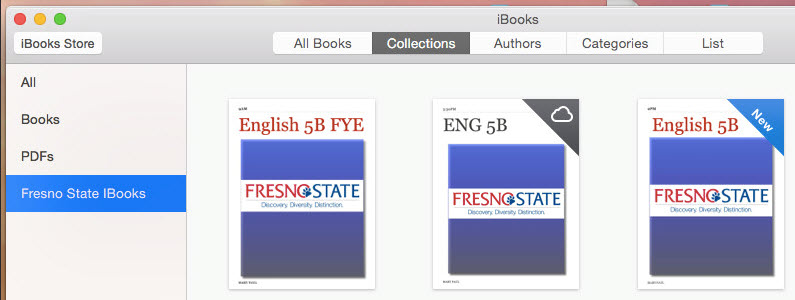
- iBook- Each class published an IBook to the IBooks store. Each student's essay became a chapter in the book. Students leave the course with more than a grade -- they have something published and can refer to their publication when applying for internships, jobs or grad school. Freshmen students are published!
Adopted Technologies?
The complete immersion of mobile application devices by both student and instructor. Lecture screencast videos, Mobile technology apps (Such as Google Classroom), Google Document Collaboration, Google Site Repository, iBook
Which Professional Development Activities Have You Participated in During Your Course Redesign?
- Semester long biweekly Faculty Learning Community DISCOVERe
- Week long summer institute FLC DISCOVERe
- Numerous conference presentations on tablet pedagogy
- Numerous presentations to visiting institutions and foundation members
Additional Resources for the Redesign?
This course redesign was fostered with the generous help and involvement of our campus instructional designers. Our campus librarian became an integral member of the course Google Community, in essence removing the library walls. Our campus AL$ coordinator was extremely helpful in the adaptation of free textbooks for this course.
Digital Applications Screencast
This is a screencast presentation for University San Francisco and will illustrate many of the digital applications discussed in this ePortfolio
Redesign Results Stage 4 |
Course Redesign Impact on Teaching and Learning
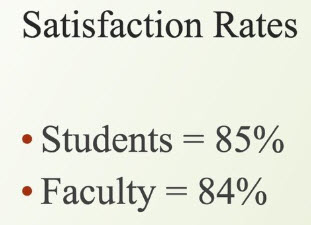
- The data included illustrates improved learning outcomes and student and faculty satisfaction. Tablet instruction improves student engagement with both the subject matter and the instructor -- a passive lecture environment becomes a high-impact learning environment. Studies show that the availability of screencast lecture videos is a powerful tool for student success; students can review a class session for further clarification and understanding. Including free electronic textbooks provides a more affordable college experience; when students arrive to class with their tablet they also arrive with their textbook. Instructors are able to confirm student engagement with instructional material and feedback, thus eliminating common misconceptions of learning outcomes. Moving freshman students into the public domain with a published book guides students to consider research, citations and copyright ethics at the beginning of their college career.
- Studies show that providing students with lecture screencast videos improves student learning outcomes. Instructor use of such mobile apps as Explain Everything can simplify the process of recording every lecture and providing a link to the mp4 video file on the campus LMS for students to easily access and review.
Assessment Findings
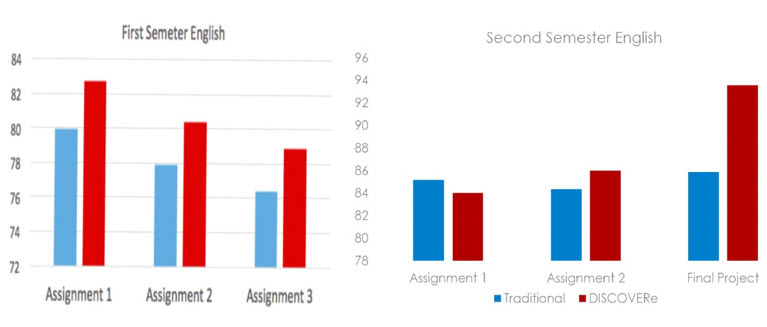
- Three-Year Grade Comparison: The graph below represents a three-year grade comparison of similar writing assignments in the first semester of a two-semester course. The blue bar represents the average scores of a traditional course for Fall 2012 and Fall 2013. The red bar represents the first Tablet course Fall 2014.
- Second Semester Grade Comparison: The graph below represents a two-year average of a traditional course and the red represents a Tablet course. The Final Project for the tablet course was an ePortfolio.
- Higher scores on 5 out of 6 assignments over two semesters.
Student Feedback
- 95% of FYE students agree that using tablets for academic work is a good idea.
- “When I'm writing a paper for my professor you can say I am putting all my effort into it but writing a paper and learning that it will be published on iBooks changes everything. I can write a good paper for my professor but I will write a very good paper if it’s going to be published. When I was told that my paper would be published as a chapter in a book I knew I had to look over my paper editing everything over and over. In my head I knew I wanted this paper to be the best paper I'd written ever. I can honestly say I spent more than the usual writing this paper. I mean, it's not always that you get to publish a paper you wrote for school.”
- “Overall, I loved this assignment. My book turned out great and I talked about a topic that I felt was important to me and that it can be something many school should work on improving.”
- “Writing the essay was not hard to do because I was writing it on something that really interested me. This essay was different from all the other essay assigned to me because my audience was not just my teacher but other people that wanted to download the book.”
Instructor Reflection
Course Redesign allows higher education faculty to become learners — to join our students in the learning process. Our students come to us with digital expectations. Teaching with mobile applications and table pedagogy allows equal participation in the digital discussions.
I will apply to the EdD program at Fresno State for August 2016 to further research and communicate the advantages of Mobile Application Technology and improved high impact learning tools using tablet pedagogy in the college classroom.