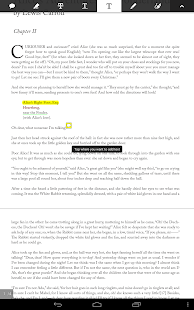
'Adobe® Reader® is the free, trusted leader for reliably viewing and interacting with PDF documents across platforms and devices. Install the free Adobe Reader mobile app to work with PDF documents on your iPad, iPhone, and iPod touch. Easily access, manage, and share a wide variety of PDF types, including PDF Portfolios, password-protected documents, fillable forms, and Adobe LiveCycle® rights-managed PDF. View PDF documents • Navigate Adobe Reader and Read documents using iOS VoiceOver Accessibility. • Quickly open PDF documents from email, the web, or any app that supports "Open In..." • View PDF Portfolios, password-protected PDFs, annotations, and drawing markups • Search text to find specific information • Select single page or continuous scroll modes • Easily zoom in on text or images for a closer view • Read in dark locations with comfort using Night Mode • Read long passages with Brightness Lock • Get definitions with iOS Dictionary support Create PDF files using Adobe CreatePDF service • Take a picture and convert it to PDF for easy sharing • Ability to buy Adobe’s CreatePDF service using In-app purchase • Create PDF files from MS Office documents (word, excel etc..) Export PDF files to various file formats using Adobe’s ExportPDF service • Ability to buy Adobe’s ExportPDF service using In-app purchase • Export PDF files to various formats (Word, Excel etc..) for easy editing Store and access documents in the cloud with Acrobat.com • Share files across all of your desktop and mobile devices with Acrobat.com • Automatically save changes back to the cloud • Synchronize where you are reading across multiple devices via Acrobat.com Annotate and comment on PDF documents • Provide feedback using the highlight, strikethrough, and underline tools • Easily mark up PDF content with the freehand drawing tool, and easily undo mistakes • Add comments anywhere in your PDF with sticky notes • Add text with the Add Text tool Fill out forms • Quickly fill out PDF forms • Have confidence that the form is correct with field validation, calculation, and formatting. • Save, sign, and forward forms to others Organize your documents • Create folders to make organizing and finding documents easier • Make copies of documents to mark up or to use as templates • Rename documents • Easily select and delete multiple documents Print and share documents • Print wirelessly with AirPrint, including your comments and forms. • Share PDFs with other applications using "Open In..." • Email PDFs as attachments • Optionally flatten PDFs when sharing via email. '
This is a free app